
AI agents · Grok Bot templates
Grok Bot templates that run your social media.
A Grok Bot template is the message that gives a Bot its job. Copy one of these, connect Beevi as a custom MCP server, and your Bot drafts posts in your brand and asks before anything goes live.
Setup takes about five minutes · Nothing publishes without your approval
Beevi · list_posts get_compass
Monday routine done. Beevi has 3 posts ready for Fern & Flour this week. Which ones should go out?
 1 · Instagram Tue 9:00
 2 · LinkedIn Wed 12:30
 3 · Facebook Fri 8:00
approve 1 and 3
Beevi · approve_post
Approved. Beevi will publish them on Tuesday and Friday.
Copy and paste
Three Grok Bot templates for social media
Each one is a short message in plain English. Your Bot finds the right Beevi tools on its own.
Weekly planner
Every Monday it sends you the week’s posts, numbered. You reply “approve 1, 3”.
You run my social media through Beevi.
- First, list my Beevi workspaces and pick the one for my business.
- Every Monday at 9am, send me the posts Beevi has ready for the week, numbered, so I can approve them.
- If the week looks thin, ask Beevi to draft a few more on this week's trends.
- When I say "approve 1, 3", approve those posts in Beevi. Beevi publishes them on schedule.
- Never approve, publish or delete anything without my OK.
Trend watcher
Each weekday it checks what’s trending for your business and drafts one post when something fits.
You watch social media trends for my business through Beevi.
- Every weekday at 8am, check this week's trends in Beevi.
- If one fits my business, ask Beevi to draft a post about it and tell me in one line why it matters.
- One draft a day at most.
- Never approve, publish or delete anything without my OK.
Blog to carousel
Send it a link to an article and it comes back with a carousel draft in your brand.
You turn my articles into social posts through Beevi.
- When I send you a link, read the article and ask Beevi to make a carousel from it for Instagram and LinkedIn.
- Send me the draft with a one-line summary of each slide.
- When I say "approve", approve it in Beevi. Beevi publishes it on schedule.
- Never approve, publish or delete anything without my OK.
Four steps
How do I connect Beevi to Grok Bot?
If you can type a sentence, you can do this.
Get your Beevi API key
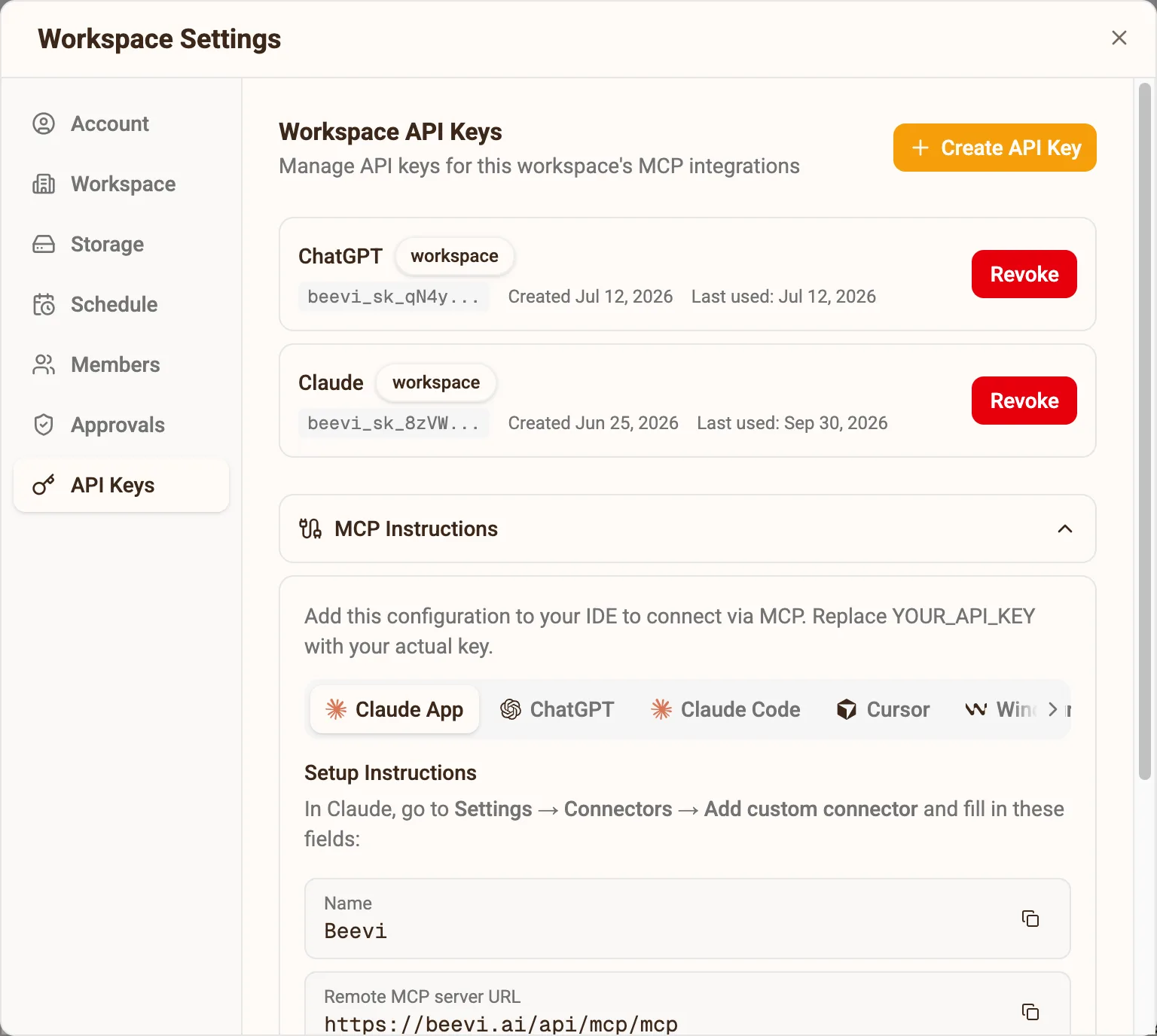
In Beevi, click Connect my AI on your home screen, or open Settings → API Keys, and create a key. Copy it now: it is only shown once. A workspace key reaches one brand; an organization key reaches all of them.
Add Beevi to Grok Bot
In any Bot chat, say this and click Add it when the Bot asks you to confirm:
Add a custom MCP server called Beevi at https://beevi.ai/api/mcp/mcpWhen it asks how to sign in, give it the header Authorization with the value Bearer followed by your key. Every Bot on your account can use Beevi after that.
Paste a template into your Bot
Pick one of the templates above and paste it into the chat of the Bot you want running your social media. The Weekly planner is a good first one.
Keep publishing in your hands
Add a Monday 9am routine for the Bot, and set publishing and approving to require approval in its rules. It drafts freely; nothing goes live without your yes.
Straight answers
Grok Bot and Beevi, answered
What is Grok Bot?
Is Grok Bot the same as Grok?
What can a Grok Bot do for social media?
How do I add an MCP server like Beevi to Grok Bot?
Is there a Beevi plugin in the Grok Bot marketplace?
Does Grok Bot need my social media passwords?
Can Grok Bot post while I am offline?
Which platforms can Grok Bot post to through Beevi?
My Bot says Beevi is not found or authentication failed. What now?
Does it cost extra?
Using ChatGPT, Claude or Cursor instead? See the Beevi MCP server setup →
Seven days, no card
Your Bot is ready. Give it a brand.
Sign up, give Beevi your website, and your first week of drafts is waiting before your Bot’s first Monday.