
AI agents · Meta Muse
Make Meta Muse your social media manager.
Muse can see how your Instagram did last week. Beevi writes, designs and publishes the next posts. Connect them once and every Monday Muse sends you the week, you reply “approve 1, 3”, and Beevi does the rest.
Setup takes about five minutes · Nothing publishes without your approval
Beevi · get_compass list_posts generate_carousel
Morning! Your carousel got the most saves on Instagram last week, so I asked Beevi for another one. 3 posts are ready:
 1 · Instagram Tue 9:00
 2 · Facebook Wed 12:30
 3 · Instagram Fri 8:00
approve all 3
Beevi · approve_post
Done. Beevi will publish them Tuesday, Wednesday and Friday.
The short version
What is Meta Muse?
Muse is Meta’s personal AI agent, announced on September 8, 2026. Unlike a chatbot, it keeps working after you close the app: it runs on its own secure cloud computer with a browser, connects to your apps through connectors, runs scheduled tasks, and asks for your approval before anything you’d want to check, like sending, buying or publishing.
- Made by
- Meta, Facebook’s parent company. Its own app, not part of Facebook
- Launched
- September 8, 2026, in the US first
- Price
- Free with usage limits; Power $20 and Max $100 a month
- Works in
- iOS, Android, muse.ai, the Mac app and WhatsApp
- Connects to
- 40+ built-in connectors, plus custom connectors like Beevi
Four steps
How do I connect Beevi to Muse?
If you can paste a message, you can do this.
Get your Beevi API key
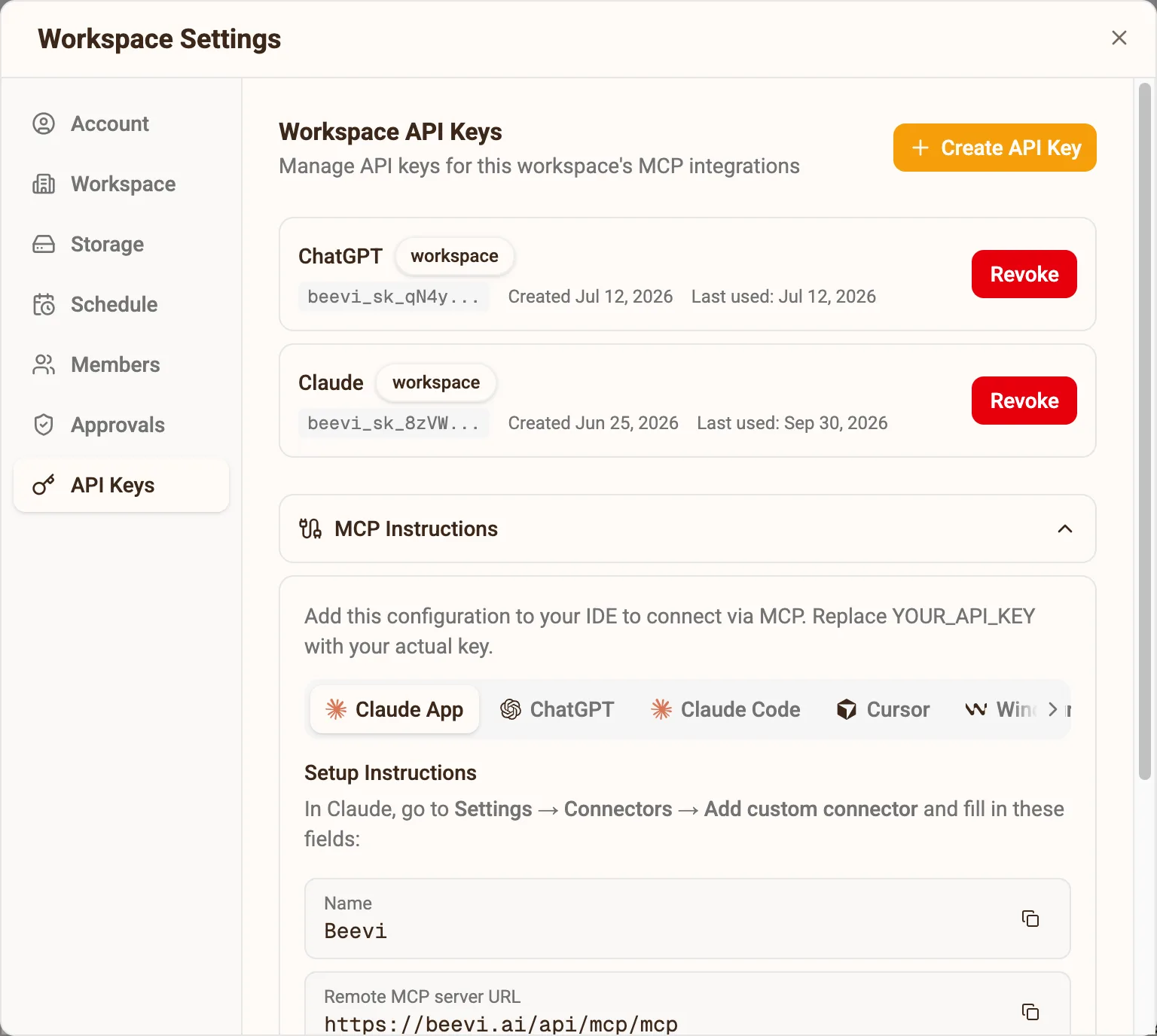
In Beevi, click Connect my AI on your home screen, or open Settings → API Keys, and create a key. Copy it now: it is only shown once. A workspace key reaches one brand; an organization key reaches all of them.
Ask Muse to add Beevi as a custom connector
Open Muse in the app, at muse.ai or in WhatsApp, and send this:
Create a custom connector called Beevi.
- It is an MCP server at https://beevi.ai/api/mcp/mcp (streamable HTTP).
- It authenticates with the header Authorization: Bearer followed by my Beevi API key. Ask me for the key in your secure credential prompt.
- Save it so every chat can use it, and send my social media requests to Beevi.
When Muse shows its secure credential prompt, paste your API key there, never in the chat. Beevi then appears under Settings → Connectors.
Give Muse its Monday job
Send this next. Muse turns the Monday line into a scheduled task.
You run my social media through Beevi. - First, list my Beevi workspaces and pick the one for my business. - Every Monday at 9am, send me the posts Beevi has ready for the week, numbered, so I can approve them. - If the week looks thin, ask Beevi to draft a few more on this week's trends. - When I say "approve 1, 3", approve those posts in Beevi. Beevi publishes them on schedule. - Never approve, publish or delete anything without my OK.Keep publishing in your hands
In Settings → Permissions, leave Connectors on Ask for some actions. Muse then asks before every approve or publish, so it drafts freely and nothing goes live without your yes.
Straight answers
Meta Muse and Beevi, answered
What is Meta Muse?
Is Muse a Facebook app?
Is Muse from Meta free?
Can Muse post to Instagram and Facebook?
What is Muse for Small Business?
How do I add a custom connector to Muse?
Does Muse support MCP servers?
Will Muse publish posts without asking me?
Muse says it can’t reach Beevi. What do I check?
Does it cost extra?
Using a different agent? OpenAI dots · Grok Bot · ChatGPT, Claude or Cursor →
Seven days, no card
Muse is ready. Give it a brand.
Sign up, give Beevi your website, and your first week of drafts is waiting before Muse’s first Monday.