
Most small shops don't have a social media problem. They have a time problem. The owner is unpacking stock, ringing up customers and answering "are you open Sunday?" messages, and the Instagram account goes quiet for two weeks at a time.
This guide gives you a retail social media strategy you can actually run from behind the counter: three goals, five post types, one weekly rhythm, and a plan for the holiday rush. It works for gift shops, boutiques, bookshops, home stores and any independent shop that sells in person, online, or both.
If you'd rather not write the posts yourself, you can create your first posts free with Beevi and edit from there.
The short version 🛍️
A good retail social media strategy for a small shop comes down to four choices:
- Pick one main platform (usually Instagram) and one helper (usually Facebook).
- Give every post one of three jobs: bring people into the store, sell online, or turn buyers into regulars.
- Rotate five post types so you never stare at a blank screen.
- Post on a fixed weekly rhythm you can keep in your busiest month, not your quietest one.
Everything below explains how to set those up in about an hour.
Step 1: Choose platforms by where your buyers already scroll
You don't need to be everywhere. A shop that posts three good things a week on one platform beats a shop that posts once a month on five.
| Platform | Best job for a small shop | Realistic pace | Priority |
|---|---|---|---|
| Show products, displays and the feel of the store | 3 feed posts + Stories most open days | Main | |
| Events, opening hours, local groups, older customers | 2 to 3 posts a week | Helper | |
| TikTok | Quick unboxing, "new in" and behind-the-counter clips | 1 to 2 videos a week, only if you enjoy video | Optional |
| Gift guides and products people plan around (home, weddings, crafts) | Pin new products as you add them | Optional | |
| B2B orders, corporate gifting, local business networking | 1 post a week | Only if you sell B2B |
Decision rule: if most sales happen in the store, Instagram plus Facebook is enough. If more than a third of sales are online, add TikTok or Pinterest, whichever fits your products better. Video-friendly products (candles, gadgets, fashion) suit TikTok. Planned purchases (home decor, wedding gifts) suit Pinterest. If you sell mostly online, our ecommerce social media marketing plan ties every post to a product page.
Step 2: Give every post one of three jobs
Retail posts fail when they try to do everything at once. Before you post, decide which job it has:
- Foot traffic. "Come see it." The call to action is a time and place: "Out on the front table this weekend," "Open till 7 tonight."
- Online sales. "Tap to shop." The call to action is a link, a product tag, or "DM us to hold one."
- Regulars. "Stay with us." No hard sell. Thank-you posts, customer photos, staff picks, the story behind the shop.
A healthy week has all three. If every post is a sale or a "shop now," people stop paying attention. If nothing ever asks for an action, the account feels nice but doesn't move stock.
Step 3: Rotate five post types 📦
These five types cover almost everything a shop needs. Rotate them and you'll always know what to post next.
1. New in. A new product, a restock, a new collection. Show it in hands or in use, not only on a white background. One line on who it's for helps more than a list of features.
2. Behind the counter. Unboxing a delivery, building the window display, wrapping a gift order, the owner choosing next season's stock. These posts make people feel like they know the shop before they visit.
3. Customer moments. A customer's photo with their purchase (with permission), a review in their own words, a regular's favorite item. Our user-generated content guide covers how to ask without being awkward.
4. Local and seasonal. Street fairs, school holidays, the weather, a nearby business you love. This is where small shops beat big chains, because the chain can't post about your street.
5. Offers and events. Sales, late openings, workshops, launch nights. Keep these to about one in five posts so they still feel special.
Stuck on the first post? A tool like our Instagram post ideas generator can give you a starting point for each type.
Step 4: Use a weekly rhythm you can keep in December
The best posting schedule is the one you'll still follow in your busiest week. Here's a simple rhythm built around how shops actually run:
| Day | Post type | Job |
|---|---|---|
| Monday | Behind the counter (deliveries, new stock arriving) | Regulars |
| Wednesday | New in (one product, shown in use) | Online sales |
| Friday | Weekend reason to visit (display, event, staff pick) | Foot traffic |
| Saturday or Sunday | Customer moment or local post (Stories are fine) | Regulars |
That's three feed posts plus a Story or two. If you want more detail on frequency, see how often small businesses should post.
Batch it. Take photos on one quiet morning a week: new stock, a display, a detail shot, a staff member holding something. Twenty minutes of photos can cover a full week of posts. Then write the captions in one sitting, not one at a time between customers.
A worked example: one week for a small gift shop
Here's what this looks like for Fern & Thread, a made-up gift and home shop with one owner and one part-time helper, selling mostly in store with a small online shop.
- Monday (behind the counter): A short clip of opening a box of hand-poured candles. Caption: "Tuesday's delivery came early. Three new scents, and the fig one is already my favorite. Out on the shelf Wednesday."
- Wednesday (new in, online sales): Photo of the fig candle on a stack of books by a window. Caption: "Fig and cedar, 40-hour burn, made two towns over. In store now, and online through the link in our bio. Want one held? Send us a message."
- Friday (foot traffic): Photo of the new front table display. Caption: "New front table for the weekend: candles, linen napkins and the mugs everyone asks about. Open 10 to 6 Saturday."
- Sunday (regulars): A customer's photo of a gift they wrapped, shared with permission. Caption: "Maya picked this up for her sister's new flat and wrapped it better than we do. Thank you for shopping small."
Notice what each post does. One job, one clear next step, and nothing that needed a photographer.
Plan the holiday season now 🎁
For most shops, November and December decide the year. Small Business Saturday falls on November 28, 2026, two days after Thanksgiving, and it's one of the best days of the year for independent shops to post.
A simple holiday plan:
- Early November: gift guides by person ("for the host," "under $25," "for the person who has everything"). These work for both foot traffic and online sales.
- Black Friday week: decide if you run a deal or skip it on purpose. Both can work. Our Black Friday post ideas cover both routes.
- Small Business Saturday: behind-the-scenes prep the day before, a live "doors open" Story, and a thank-you post that evening.
- December: last-order dates for online shipping, gift wrapping, extended hours, then a thank-you post after the holidays. See our Christmas post ideas for more.
Our free social media holiday calendar lists the dates worth planning around so they don't sneak up on you.
What to track (keep it simple)
You don't need a dashboard. Once a month, look at three things:
- Messages asking about products, stock or hours. These are buying signals, and they show which posts made people act.
- "I saw it on Instagram" at the till. Ask new customers how they found you and keep a tally on a sticky note.
- Clicks to your online shop from your bio link, if you sell online.
Then do more of the post type that produced the most of all three. That's the whole review.
Common mistakes small shops make
- Only posting product photos. People follow shops for the people and the place, not only the stock.
- Posting a lot in quiet months, nothing in busy ones. Schedule ahead so December isn't silent.
- Every post is a sale. Keep offers to about one in five posts.
- Copying big retailers. You can't out-budget them. You can out-local them.
- Waiting for perfect photos. A clear phone photo in good window light is enough.
Where Beevi fits
Writing three captions a week sounds small until it's 9pm and you still haven't done it. Beevi is an AI social media manager that learns your shop, your products and your voice, then plans, writes and designs a week of posts for you. It can keep recurring products recognizable across posts, so your best-sellers look like your best-sellers, not stock images.
Nothing goes out without your approval, on any plan. You review the week on a calendar, change what you want, and Beevi schedules it to Instagram, Facebook, TikTok, LinkedIn, X and YouTube. You can connect one account per platform in each workspace.
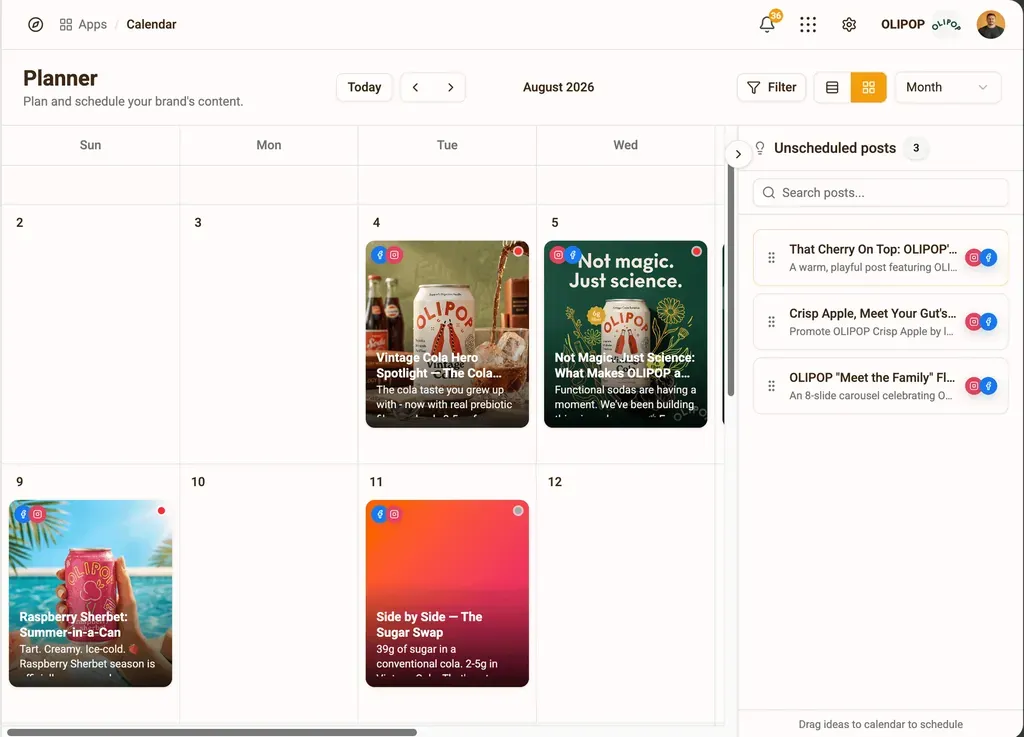
We estimate it gives back 5 to 10 hours a week (our own founder estimate, not a study). If you have a helper or an agency who should review posts too, shareable review links and approval chains are on the Team and Agency plans; see pricing for details.
Want to see what a week would look like for your shop? Create your first posts free.
Your next step
Pick your main platform, write down your five post types, and block twenty minutes this week for photos. That alone puts you ahead of most shops on your street.
When you're ready to hand off the writing, create your first posts free and let Beevi draft your first week while you run the shop.