
The best Valentine's Day social media post ideas for a small business are simple: one clear offer, the date it ends, and a few warm posts that speak to more than couples. Plan 6 to 10 posts over about three weeks. Valentine's Day 2027 falls on a Sunday, so Galentine's Day is Saturday, February 13, and many people in the US get Monday, February 15, off. Below are 35 ideas sorted by type of business, a three-week plan and captions you can copy.
Most Valentine's posts online come from big brands with design teams. You don't need that. You need posts that tell people what you offer, when to order or book, and why it fits the people they love, including friends, coworkers and pets.
For every other date worth posting about this year, see the free social media holiday calendar. If you are still planning December, start with our Christmas social media post ideas. (We build Beevi, an AI social media manager that writes, designs and schedules posts, and nothing goes live until you approve it. You can create your first posts free, or just use the ideas below on your own.)
Valentine's Day 2027 dates that shape your posts 💘
Because February 14 is a Sunday in 2027, the busy days stretch across a long weekend. Restaurants, florists and salons will feel Friday and Saturday the most.
| Date | Day | What to post |
|---|---|---|
| February 1 to 7 | Mon to Sun | Your offer, gift guide and order or booking deadline |
| February 8 to 12 | Mon to Fri | Reminders, behind the scenes, "still available" updates |
| February 13 | Saturday | Galentine's Day: friends, brunch, group bookings |
| February 14 | Sunday | Valentine's Day: last-minute gifts, open hours, one warm post |
| February 15 | Monday | Washington's Birthday, a US federal holiday: late celebrations, day-after deals |
| February 16 onward | Tue | A thank-you post, then back to your normal plan |
Post your deadline at least a week early. People who order online or book a table plan ahead, and the people who wait need a clear "last chance" date.
Who people buy for (and why your posts should too)
Valentine's Day is not only about couples anymore. The National Retail Federation's 2026 Valentine's Day survey found:
- 55% of US consumers planned to celebrate, and they budgeted a record $199.78 each on average.
- Gifts for partners were still the biggest share, at an expected $14.5 billion.
- 33% planned to buy for friends, 21% for coworkers, and a record 35% for their pets.
- Of the people not celebrating, 31% still planned to mark the day another way, like a treat for themselves or a get-together with friends.
- 38% planned to shop online, the top place to buy.
So a feed full of couples only talks to part of your audience. A post called "Something small for the office" or "A treat for the dog who waited at home" reaches people the usual heart-covered post misses. NRF releases a new survey each January, so check it before you post.
A simple 3-week Valentine's posting plan
You don't need a post every day. You need the right post in the right week. This plan uses about 8 posts.
| Week | Post jobs | Example |
|---|---|---|
| Jan 25 to 31 | Announce the offer and the deadline | "Valentine's boxes are here. Order by Feb 10." |
| Feb 1 to 7 | Gift guide, behind the scenes, a poll | "Three gifts at three prices" |
| Feb 8 to 12 | Reminders, a customer story, last slots | "Four tables left for Saturday night" |
| Feb 13 to 15 | Galentine's, Valentine's Day, open hours | "Open until 6 p.m. on Sunday" |
| Feb 16 | Thank-you post | "Thank you for making this week so busy" |
If you only have time for four posts, keep the offer announcement, the deadline reminder, the Galentine's or friends post, and the Valentine's Day post itself.
Valentine's Day post ideas for shops and online stores 🎁
For a full year-round plan, see our retail social media strategy or, if you sell mostly online, our ecommerce social media marketing guide.
1. Gift guide by budget. A carousel with gifts under $25, under $50 and under $100. People save these and come back.
2. Gift guide by person. "For your partner," "for your best friend," "for your coworker," "for the dog." It matches how people really shop.
3. The order deadline post. Big, clear and pinned to the top of your profile. Repeat it in Stories every few days.
4. Wrapping on video. Fifteen seconds of your hands tying a ribbon. It proves the gift wrap is real and looks lovely.
5. "This or that" product post. Two items side by side. Ask people to vote in the comments.
6. Bundle for two. Pair two products at one price. Show both in one photo.
7. Gift card for late shoppers. "Arrives by email in one minute." Post it again on February 13 and 14.
8. Returns and exchanges made clear. "Wrong size? Swap it until March 1." Nervous buyers relax when they see this.
Valentine's Day post ideas for restaurants, cafes and bakeries ☕
For more food ideas, see our restaurant social media post ideas and coffee shop social media ideas.
9. The menu for the night. Each dish, the price per person or per couple, and how to book.
10. Tables left. A Stories update in the week before. Real numbers only.
11. Galentine's brunch. Written for a group of friends, not a couple. Saturday the 13th is your day for this.
12. Pre-order boxes. Cookies, chocolates, cakes or a dinner kit. Give the pickup times and the last order date.
13. Behind the scenes at 6 a.m. Hearts being piped, dough being shaped. People love seeing the work.
14. Takeout for the stay-home crowd. What is in the box, the price and the pickup window.
15. The Monday-after post. "Couldn't get a table? We're open Monday." Many people are off work on the 15th.
Valentine's Day post ideas for salons, spas and beauty studios 💅
Our salon social media guide has the year-round version.
16. Open slots, posted as a list. "Friday: 2 p.m., 4 p.m. Saturday: 10 a.m." Easy to read, easy to book.
17. Gift card in a pretty envelope. A clean photo and one line: "The gift that always fits."
18. Date-night looks. A carousel of three styles or nail sets clients can ask for.
19. Galentine's group booking. Three or four friends, one time slot, maybe a small extra like tea or a mini treatment.
20. Self-care post. For the people who are celebrating themselves this year. A relaxing photo and a booking link.
Valentine's Day post ideas for gyms and service businesses 🛠️
Not every business is a natural fit for Valentine's Day. That's fine. If hearts would feel forced, post something useful instead. Your followers will notice the honesty.
21. Partner workout. For gyms and studios: a two-person class or a "bring a friend free" session. Our gym social media post ideas have more.
22. Gift a service. A cleaning, a car detail, a lesson pack or a massage, sold as a gift card. Many people would love to get a clean house.
23. Pet treats and safety. For pet shops, groomers and vets: a Valentine's treat for pets, plus a reminder that chocolate is not one. Our veterinary post ideas go further.
24. Long-weekend reminder. For trades, clinics and repair shops: your hours over the Feb 13 to 15 weekend.
25. "We love our customers" thank-you. A short note from the owner. No sales, just thanks.
26. Team picks. Each person on your team shares their favorite product or service to give.
Valentine's Day posts any business can use 💌
27. Galentine's shout-out. Ask people to tag the friend they would bring.
28. Pets are Valentines too. A photo of a customer's pet (with permission) or the shop dog.
29. Treat yourself. A post for people who are skipping the romance and buying for themselves.
30. The anti-Valentine's post. A light joke for the people who don't care about February 14. Keep it kind.
31. Love notes from customers. Share a real review or message, with the customer's OK.
32. A simple poll. "Chocolate or flowers?" "Dinner out or takeout?" Easy to answer, fun to watch.
33. How it's made. A short clip of your product being made or your space being set up for the week.
34. Red and pink, quietly. Not ready for hearts? Use one red or pink detail in your normal photo. It nods to the day without changing your style.
35. The thank-you post on the 16th. A photo from the busy weekend and a thank-you. It's a nice way to close the week.
Caption starters you can copy
Short captions work best. Say what it is, when it ends and how to get it.
| Post type | Caption starter |
|---|---|
| Offer | "Our Valentine's box is back. Order by Feb 10 for pickup on Saturday." |
| Gift guide | "Three gifts, three budgets. Which one is yours?" |
| Galentine's | "Brunch for the friends who always show up. Tag yours." |
| Last slots | "Two times left on Friday. Book at the link in our bio." |
| Pets | "Don't forget the one who waits by the door. Treats in store now." |
| Self-care | "No date needed. You deserve an hour off." |
| Thank-you | "What a weekend. Thank you for choosing us." |
Worked example: one florist's Valentine's plan
To show how this fits together, here is a plan for a made-up flower shop, "Maple Street Flowers." It has one offer: a small bouquet in three sizes, with delivery on February 13 and pickup on February 14.
- Monday, January 25: offer post. Photo of the three sizes, the prices and "Order by February 10."
- Thursday, January 28: behind the scenes. A short clip of the first test bouquet being wrapped.
- Tuesday, February 2: gift guide by person. Partner, mom, best friend, coworker.
- Monday, February 8: deadline reminder, pinned. "Two days left to order for delivery."
- Thursday, February 11: "Still available" Stories post for pickup orders.
- Saturday, February 13: Galentine's post. "Flowers for the friend who gets it."
- Sunday, February 14: one warm post with today's pickup hours.
- Tuesday, February 16: thank-you post with a photo of the empty buckets.
That's eight posts, written in one sitting, with a clear job for each.
Valentine's posting mistakes to skip
- Fake scarcity. "Only 3 left!" when there are 30 hurts trust fast. Post real numbers or none.
- Giveaways without rules. If you run one on Instagram, you are responsible for the official rules and eligibility, and you can't ask people to tag themselves in photos they aren't in. Read Instagram's promotion guidelines first.
- Reposting without asking. Customer photos and reviews are great, but ask first. Our user-generated content guide shows how.
- Hearts on everything. Two or three themed posts are plenty for most businesses. Keep the rest of your feed normal.
- Posting the deadline too late. One reminder on February 12 is not enough. Start a week before.
How to plan it in one afternoon
Write all your posts in one sitting, then schedule them. Our guide to batching a month of social content in one afternoon walks through it. Valentine's Day is also a good test of your bigger social media content plan: if your plan has space for one seasonal week, it can handle the next one too.
If you'd rather not start from a blank page, Beevi can help. Its Compass turns weekly trends and holidays into post ideas for your business, then Beevi drafts the posts in your brand's voice. You still review every one. Here is the approval step: each post waits until you check it, then you approve it or skip it.
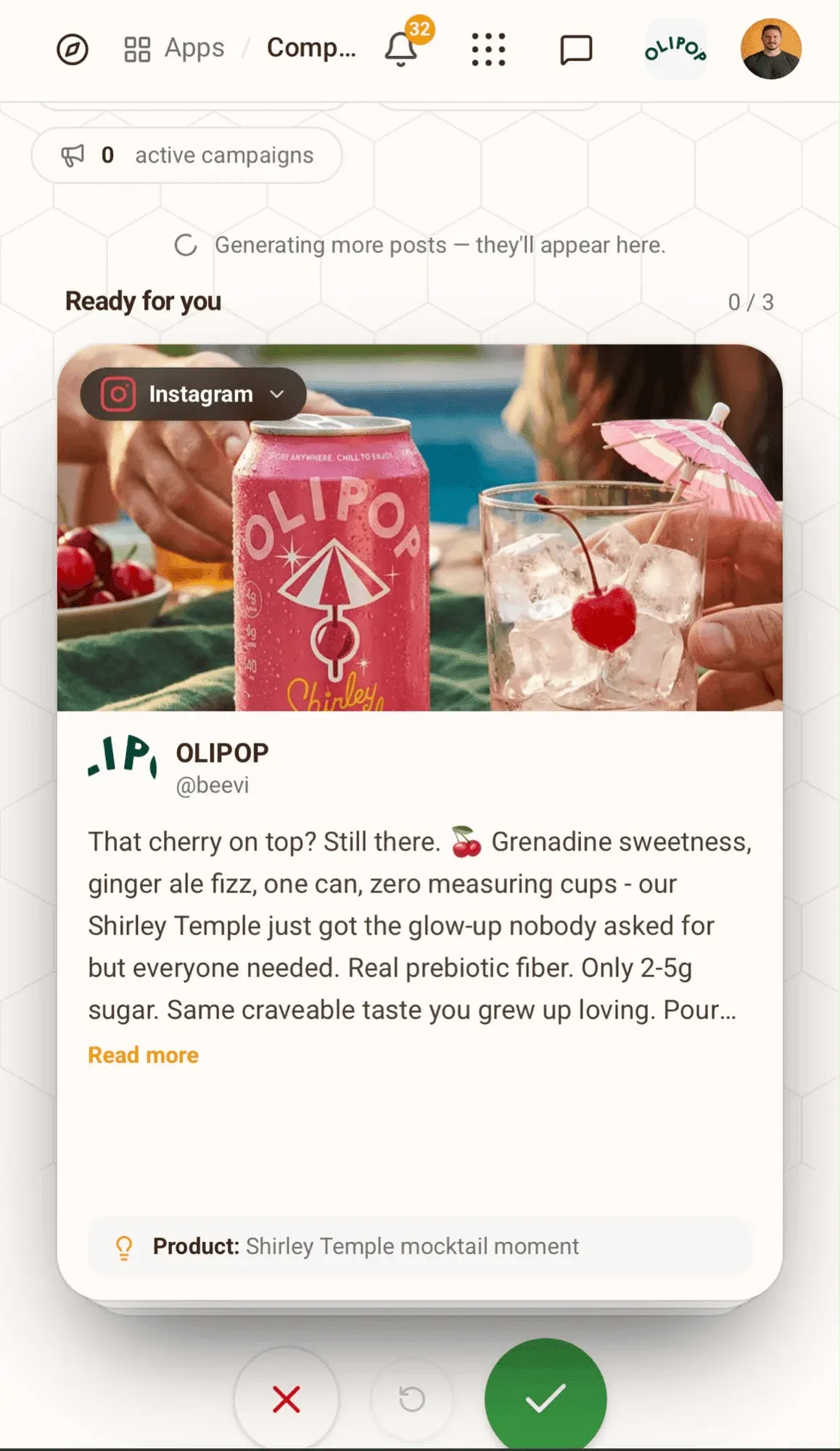
That step is why approval matters on busy weeks. Nothing goes live until you approve it, on every plan. Read more about how approvals work in Beevi. If you want to try it, create your first posts free.
Beevi is not the right fit if you want a design template gallery or a big ad campaign. It's built for small teams who want a steady week of good posts without writing each one by hand.
Your Valentine's plan in one line
Pick one offer, post the deadline a week early, speak to friends and pets as well as couples, and say thank you on the 16th.
Ready to skip the blank screen? Create your first posts free and let Beevi draft your Valentine's week for you. You can see the plans on our pricing page.